Data Guard Physical Standby (19c) Setup on Linux 8.4 Using the Data Guard Broker - Part 2/3
- ousseinioumarou68
- 1. Nov. 2021
- 17 Min. Lesezeit
Aktualisiert: 22. Okt. 2025
VIII. Step 8: Oracle Database 19c Creation with DBCA for Data Guard Primary
8.1 Create the database only on the primary database server: dbsrv1


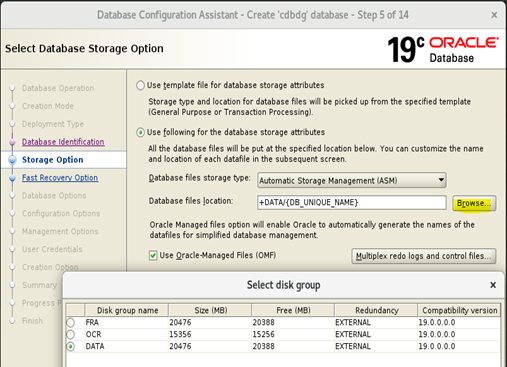
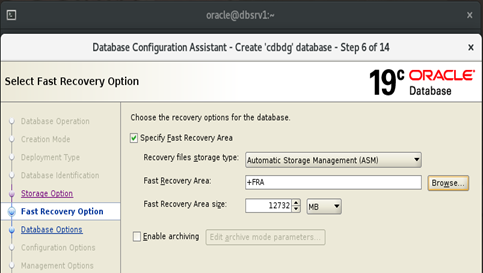


Optionally: Database Express selected to be configured


8.2 Database Verification


IX. Step 9: Database servers configuration
9.1 Primary database server parameters changes
9.1.1 Enable Archiving
The primary server must run in archive log mode.
This is the basic requirement for primary to run in archive log mode. If it’s not in archive log mode, use below:
SQL> archive log list;
or
select log_mode from v$database;
LOG_MODE
------------
NOARCHIVELOG
SQL>
SYS@cdbdg> shutdown immediate
SYS@cdbdg> startup mount
SYS@cdbdg> alter database archivelog;
SYS@cdbdg> alter database open;
SYS@cdbdg> archive log list;
SYS@cdbdg> select log_mode from v$database;
LOG_MODE
------------
ARCHIVELOG
SYS@cdbdg>
9.1.2 Enable FORCE LOGGING
Enable force logging: In oracle, users can restrict redo generation for SQL by using NOLOGGING clause. This NOLOGGING transaction will be a problem for physical standby. Hence, we force logging so even user uses NOLOGGING clause, every SQL will be logged on to redo.
Enabled forced logging by issuing the following command.
SYS@cdbdg> select name, force_logging from v$database;
NAME FORCE_LOGGING
--------- --------------------------------
CDBDG NO
SYS@cdbdg> alter database force logging;
Database altered.
SYS@cdbdg> select name, force_logging from v$database;
NAME FORCE_LOGGING
--------- ---------------------------------
CDBDG YES
SYS@cdbdg> alter system switch logfile;
System altered.
SYS@cdbdg>
9.1.3 Set Standby file management to AUTO
Standby file management: We need to make sure whenever we add/drop datafile in primary database, those files are also added / dropped on standby.
Make sure the STANDBY_FILE_MANAGEMENT parameter is set to AUTO.
SYS@cdbdg> show parameter file_management
NAME TYPE VALUE
-------------------------- ------------ -------------------
standby_file_management string MANUAL
SYS@cdbdg>
SYS@cdbdg> alter system set standby_file_management=auto;
System altered.
SYS@cdbdg> show parameter file_management
NAME TYPE VALUE
--------------------------- ----------- ------------------
standby_file_management string AUTO
SYS@cdbdg>
9.1.4 Enable FLASHBACK
Enable flashback on primary: Flashback database is highly recommended because in case of failover, you need not re-create primary database from scratch.
If you want to use flashback database, enable it on the primary now, so it will be
enabled on the standby also. It's very useful in case of Failover, to quickly reinstate the database. Otherwise, you have to manually recreate the standby again.
SYS@cdbdg> select FLASHBACK_ON from v$database;
FLASHBACK_ON
------------------
NO
SYS@cdbdg> alter database flashback on;
Database altered.
SYS@cdbdg> select FLASHBACK_ON from v$database;
FLASHBACK_ON
------------------
YES
SYS@cdbdg>
9.1.5 Check DB_RECOVERY_FILE_DEST_SIZE
SYS@cdbdg> show parameter db_recovery_file_dest_size
NAME TYPE VALUE
-------------------------- ----------- ---------------------
db_recovery_file_dest_size big integer 12732M
SYS@cdbdg>
9.1.6 DB_NAME, DB_UNIQUE_NAME
Here both are set to "cdbdg" on the primary database.
SYS@cdbdg> show parameter db_name
NAME TYPE VALUE
----------------------- ----------- ----------------
db_name string cdbdg
SYS@cdbdg>
SYS@cdbdg> show parameter db_unique_name
NAME TYPE VALUE
----------------------- ----------- ----------------
db_unique_name string cdbdg
SYS@cdbdg>
NOTE: The DB_NAME of the standby database will be the same as that of the primary, but it must have a different DB_UNIQUE_NAME value. For this example, the standby database will have the value "cdbdg_stby".
9.1.7 LOG_ARCHIVE_CONFIG
SYS@cdbdg> show parameter log_archive_config
NAME TYPE VALUE
---------------------- ----------- -------------------
log_archive_config string
SYS@cdbdg>
SYS@cdbdg> alter system set
log_archive_config='dg_config=(cdbdg,cdbdg_stby)';
System altered.
SYS@cdbdg> show parameter log_archive_config
NAME TYPE VALUE
----------------------- ----------- ------------------------------
log_archive_config string dg_config=(cdbdg,cdbdg_stby)
SYS@cdbdg>
9.1.8 FAL_CLIENT, FAL_SERVER
FAL stets for Fetch Archive Log)
SYS@cdbdg> show parameter fal
NAME TYPE VALUE
-------------------- ----------- -----------------------
fal_client string
fal_server string
SYS@cdbdg>
SYS@cdbdg> alter system set fal_client='cdbdg';
System altered.
SYS@cdbdg> alter system set fal_server='cdbdg_stby';
System altered.
SYS@cdbdg> show parameter fal
NAME TYPE VALUE
------------------- ----------- -----------------------
fal_client string cdbdg
fal_server string cdbdg_stby
SYS@cdbdg>
9.1.9 LOG_ARCHIVE_FORMATEnable Archiving
SYS@cdbdg> show parameter log_archive_format
NAME TYPE VALUE
-------------------- ----------- -----------------------
log_archive_format string %t_%s_%r.dbf
SYS@cdbdg>
SYS@cdbdg> alter system set log_archive_format='%t_%s_%r.arc'
scope=spfile;
System altered.
9.1.10 REMOTE_LOGIN_PASSWORDFILE
This parameter should be set to EXCLUSIVE, which ist he default
SYS@cdbdg> show parameter remote_login_passwordfile
NAME TYPE VALUE
---------------------------- ----------- -----------------
remote_login_passwordfile string EXCLUSIVE
SYS@cdbdg>
9.2 Configure Standby redo log files
These files will be used during switchover/failover operations. The standby redo logs should be at least as big as the largest online redo log and there should be one extra group per thread compared the online redo logs.
Thus: number of standby redo logs = number of online redo logs + 1
First, you have to determine the number oft he redo log files and their size. Then,
SYS@cdbdg> set lines 150
SYS@cdbdg> col FILE_NAME for a55
SYS@cdbdg> SELECT a.GROUP#, a.THREAD#, a.SEQUENCE#, a.ARCHIVED,
2 a.STATUS, b.MEMBER AS FILE_NAME,
3 (a.BYTES/1024/1024) AS SIZE_MB
4 FROM v$log a
5 JOIN v$logfile b ON a.Group#=b.Group#
6 ORDER BY a.GROUP#;

Then add the standby redo logs. Here, I have added multiplexed redo log files, but however, this is not necessary. Only 4 would be enough.
ALTER DATABASE ADD STANDBY LOGFILE GROUP 4 ('+DATA','+FRA') SIZE 200M;
ALTER DATABASE ADD STANDBY LOGFILE GROUP 5 ('+DATA','+FRA') SIZE 200M;
ALTER DATABASE ADD STANDBY LOGFILE GROUP 6 ('+DATA','+FRA') SIZE 200M;
ALTER DATABASE ADD STANDBY LOGFILE GROUP 7 ('+DATA','+FRA') SIZE 200M;
SYS@cdbdg> ALTER DATABASE ADD STANDBY LOGFILE GROUP 4
('+DATA','+FRA') SIZE 200M;
Database altered.
SYS@cdbdg> ALTER DATABASE ADD STANDBY LOGFILE GROUP 5
('+DATA','+FRA') SIZE 200M;
Database altered.
SYS@cdbdg> ALTER DATABASE ADD STANDBY LOGFILE GROUP 6
('+DATA','+FRA') SIZE 200M;
Database altered.
SYS@cdbdg> ALTER DATABASE ADD STANDBY LOGFILE GROUP 7
('+DATA','+FRA') SIZE 200M;
Database altered.
SYS@cdbdg>
Check the standby log files via below query
SYS@cdbdg> SELECT GROUP#,THREAD#,SEQUENCE#,ARCHIVED,STATUS FROM
V$STANDBY_LOG;
GROUP# THREAD# SEQUENCE# ARC STATUS
---------- ---------- ---------- ---- ----------
4 0 0 YES UNASSIGNED
5 0 0 YES UNASSIGNED
6 0 0 YES UNASSIGNED
7 0 0 YES UNASSIGNED
9.3 Create or scp the password file to the standby server
Create a password file, with the SYS password matching that of the primary database.
Scp the password file to the standby site or create a new one. Both password files should be identical. This is needed for cloning purpose.
Create a backup password file or scp the file from primary
[oracle@dbsrv1 dbs]$ pwd
/u01/app/oracle/product/19.3.0/db_1/dbs
[oracle@dbsrv1 dbs]$
[oracle@dbsrv1 dbs]$ ls -lrt orapwcdbdg
-rw-r-----. 1 oracle oinstall 2048 Oct 22 23:24 orapwcdbdg
[oracle@dbsrv1 dbs]$
[oracle@dbsrv1 dbs]$ scp orapwcdbdg dbsrv2:/u01/app/oracle/product/19.3.0/db_1/dbs/
oracle@dbsrv2's password:
orapwcdbdg 100% 2048 2.4MB/s 00:00
[oracle@dbsrv1 dbs]$
9.4 Network Service Setup
Entries for the primary and standby databases are needed in the "$ORACLE_HOME/network/admin/tnsnames.ora" files on both servers. You can create these using the Network Configuration Utility (netca) or manually. The following entries were used during this setup.
NOTE: Notice the use of the SID, rather than the SERVICE_NAME in the entries. This is important as the broker will need to connect to the databases when they are down, so the services will not be present.
Since grid infrastructure for Oracle Restart is running, do not stop and start the listener using lsnrctl stop/start. Use srvctl stop/start listener from the grid home.
If its a Dataguard Environment or you used Auxiliary channel for RMAN
In Some cases we need to overcome with this problem like dataguard configuration. In which our standby database is in recover mode means it’s in mounted state for apply the redo logs of primary database. In that case listener status for service is Blocked or RESTRICTED. To overcome from it we used the following parameter in tnsnames.ora file: (UR=A) clause is used for TNS connect strings has been created as an enhancement.*(UR=A)* clause is intended to work with a dynamically registered handler so the use of SERVICE_NAME versus SID is preferred. (ID 362656.1)
tnsnames.ora: Use below tns entries and put them under oracle user:
$ORACLE_HOME/ /network/admin/tnsnames.ora.
[oracle@dbsrv1 admin]$ pwd
/u01/app/oracle/product/19.3.0/db_1/network/admin
[oracle@dbsrv1 admin]$ cat tnsnames.ora
cdbdg =
(DESCRIPTION =
(ADDRESS_LIST =
(ADDRESS = (PROTOCOL = TCP)(HOST = dbsrv1)(PORT = 1521))
)
(CONNECT_DATA =
(SID = cdbdg)
)
)
cdbdg_stby =
(DESCRIPTION =
(ADDRESS_LIST =
(ADDRESS = (PROTOCOL = TCP)(HOST = dbsrv2)(PORT = 1521))
)
(CONNECT_DATA =
(SID = cdbdg)
)
)
[oracle@dbsrv1 admin]$ ls -l
Scp the tnsnames.ora to the standby site
[oracle@dbsrv1 admin]$
[oracle@dbsrv1 admin]$ scp tnsnames.ora dbsrv2:/u01/app/oracle/product/19.3.0/db_1/network/admin
oracle@dbsrv2's password:
tnsnames.ora 100% 334 308.8KB/s 00:00
[oracle@dbsrv1 admin]$
listener.ora: Switch to grid user or oracle user with grid infrastructure home properly set. Add the entries for static listener.
[oracle@dbsrv1 ~]$ . grid_env
[oracle@dbsrv1 ~]$ env | grep ORA
ORACLE_UNQNAME=cdbdg
ORACLE_SID=+ASM
ORACLE_BASE=/u01/app/oracle
ORACLE_HOME=/u01/app/19.3.0/grid
ORACLE_TERM=xterm
ORACLE_HOSTNAME=dbsrv1.localdomain
[oracle@dbsrv1 ~]$
oracle@dbsrv1 ~]$ cd $ORACLE_HOME/network/admin
[oracle@dbsrv1 admin]$ pwd
/u01/app/19.3.0/grid/network/admin
[oracle@dbsrv1 admin]$ cat listener.ora
#Backup file is /u01/app/oracle/crsdata/dbsrv1/output/listener.ora.bak.dbsrv1.oracle line added by Agent
LISTENER=(DESCRIPTION=(ADDRESS_LIST=(ADDRESS=(PROTOCOL=IPC)(KEY=LISTENER)))) # line added by Agent
ENABLE_GLOBAL_DYNAMIC_ENDPOINT_LISTENER=ON # line added by Agent
VALID_NODE_CHECKING_REGISTRATION_LISTENER=ON # line added by Agent
# Added for Data Guard setup
LISTENER =
(DESCRIPTION_LIST =
(DESCRIPTION =
(ADDRESS = (PROTOCOL = TCP)(HOST = dbsrv1)(PORT = 1521))
(ADDRESS = (PROTOCOL = IPC)(KEY = EXTPROC1521))
)
)
SID_LIST_LISTENER=
(SID_LIST=
(SID_DESC=
(GLOBAL_DBNAME=cdbdg)
(SID_NAME=cdbdg)
(ORACLE_HOME=/u01/app/oracle/product/19.3.0/db_1)
(ENVS="TNS_ADMIN=/u01/app/oracle/product/19.3.0/db_1/network/admin")
)
(SID_DESC=
(GLOBAL_DBNAME=cdbdg_DGMGRL)
(SID_NAME=cdbdg)
(ORACLE_HOME=/u01/app/oracle/product/19.3.0/db_1)
(ENVS="TNS_ADMIN=/u01/app/oracle/product/19.3.0/db_1/network/admin")
)
)
ADR_BASE_LISTENER = /u01/app/oracle
[oracle@dbsrv1 admin]$
Bounce/Restart the listener in the grid environment and check the status and services.
[oracle@dbsrv1 admin]$ pwd
/u01/app/19.3.0/grid/network/admin
[oracle@dbsrv1 admin]$ srvctl stop listener
[oracle@dbsrv1 admin]$ srvctl start listener
[oracle@dbsrv1 admin]$ lsnrctl status
[oracle@dbsrv1 admin]$ lsnrctl services
9.5 Standby database server parameters configuration
9.5.1 Verify the existence of the password file
[oracle@dbsrv2 ~]$ cd $ORACLE_HOME/dbs
[oracle@dbsrv2 dbs]$ ls -l orapwcdbdg
-rw-r-----. 1 oracle oinstall 2048 Oct 25 10:54 orapwcdbdg
[oracle@dbsrv2 dbs]$
9.5.2 Temporary initxxx.ora parameter file
Create a parameter file for the standby database called "initcdbdg_stby.ora" with the following contents: *.db_name='cdbdg', where ever you want:
[oracle@dbsrv2 ~]$ pwd
/home/oracle
[oracle@dbsrv2 ~]$ cat initcdbdg_stby.ora
*.db_name='cdbdg'
[oracle@dbsrv2 ~]$
9.5.3 File System and ASM diskgroups directories-dependent parameters
Get the list of directory-dependent parameters on the primary database and create the same directories on the standby server on the file system and in ASM.
select name, value from v$parameter where upper(value) like upper(‘%/cdbdg/%‘);
SYS@cdbdg> col NAME format a25
SYS@cdbdg> col VALUE format a70
SYS@cdbdg> select name, value from v$parameter where upper(value) like upper('%/cdbdg/%');
NAME VALUE
------------------------- ------------------------------------------
spfile +DATA/CDBDG/PARAMETERFILE/spfile.269.1086651125
control_files +DATA/CDBDG/CONTROLFILE/current.260.1086650663,
+FRA/CDBDG/CONTROLFILE/current.256.1086650663
core_dump_dest /u01/app/oracle/diag/rdbms/cdbdg/cdbdg/cdump
audit_file_dest /u01/app/oracle/admin/cdbdg/adump
Create cdbdg and subdirectories like adump and others.
[oracle@dbsrv2 admin]$ pwd
/u01/app/oracle/admin
[oracle@dbsrv2 admin]$ mkdir cd cdbdg cdbdg_stby
[oracle@dbsrv2 admin]$ cd cdbdg/
[oracle@dbsrv2 cdbdg]$ mkdir adump dpdump pfile scripts xdb_wallet
[oracle@dbsrv2 cdbdg]$
[oracle@dbsrv2 cdbdg]$ ls -l
[oracle@dbsrv2 cdbdg]$
[oracle@dbsrv2 cdbdg]$ cd ../cdbdg_stby
[oracle@dbsrv2 cdbdg_stby]$ mkdir adump dpdump pfile scripts xdb_wallet
[oracle@dbsrv2 cdbdg_stby]
On file system as oracle user with properly set environment variables
[oracle@dbsrv2 ~]$ ls -l /u01/app/oracle/admin/cdbdg/adump
total 0
[oracle@dbsrv2 rdbms]$ pwd
/u01/app/oracle/diag/rdbms
[oracle@dbsrv2 rdbms]$ ls -l
total 0
drwxr-xr-x. 3 oracle oinstall 19 Oct 24 22:48 cdbdg
drwxr-xr-x. 3 oracle oinstall 24 Oct 24 22:48 cdbdg_stby
[oracle@dbsrv2 rdbms]$ ls -l cdbdg
total 0
drwxr-xr-x. 2 oracle oinstall 6 Oct 24 22:48 cdbdg
[oracle@dbsrv2 rdbms]$
[oracle@dbsrv2 rdbms]$ ls -l cdbdg_stby/
total 0
drwxr-xr-x. 2 oracle oinstall 6 Oct 24 22:48 cdbdg_stby
[oracle@dbsrv2 rdbms]$
In ASM: as oracle user with grid environment set, in order to use asmcmd command
(Alternatively, verify ASM diskgroups and Naming structures on primary and create them on the standby side).
oracle@dbsrv1 ~]$ which asmcmd
/u01/app/19.3.0/grid/bin/asmcmd
[oracle@dbsrv1 ~]$
[oracle@dbsrv1 ~]$ asmcmd -p
ASMCMD [+] > ls -l
State Type Rebal Name
MOUNTED EXTERN N DATA/
MOUNTED EXTERN N FRA/
MOUNTED EXTERN N OCR/
ASMCMD [+] >
ASMCMD [+] > ls -l DATA
ASMCMD [+] > ls -l FRA
Create same directories on standby. I created one with db_name (CDBDG) and what with db_unique_name (CDBDG_STBY) in +DATA and +FRA, not in +OCR because this diskgroup is only for ASM internal use.
[oracle@dbsrv2 ~]$ which asmcmd
/u01/app/19.3.0/grid/bin/asmcmd
[oracle@dbsrv2 ~]$
[oracle@dbsrv2 ~]$ asmcmd -p
ASMCMD [+] >
ASMCMD [+] > ls -l
State Type Rebal Name
MOUNTED EXTERN N DATA/
MOUNTED EXTERN N FRA/
MOUNTED EXTERN N OCR/
ASMCMD [+] >
ASMCMD [+] > cd DATA
ASMCMD [+DATA] > ls -l
ASMCMD [+DATA] >
ASMCMD [+DATA] > mkdir CDBDG
ASMCMD [+DATA] > mkdir CDBDG_STBY
ASMCMD [+DATA] >
ASMCMD [+DATA] > cd CDBDG
ASMCMD [+DATA/CDBDG] > ls -l
ASMCMD [+DATA/CDBDG] > mkdir CONTROLFILE
ASMCMD [+DATA/CDBDG] > mkdir DATAFILE
ASMCMD [+DATA/CDBDG] > mkdir ONLINELOG
ASMCMD [+DATA/CDBDG] > mkdir PARAMETERFILE
ASMCMD [+DATA/CDBDG] > mkdir TEMPFILE
ASMCMD [+DATA/CDBDG] >
ASMCMD [+DATA/CDBDG] > ls -l
ASMCMD [+DATA] > cd CDBDG_STBY
ASMCMD [+DATA/CDBDG_STBY] >
ASMCMD [+DATA/CDBDG_STBY] > ls -l
ASMCMD [+DATA/CDBDG_STBY] >
ASMCMD [+DATA/CDBDG_STBY] > mkdir CONTROLFILE DATAFILE ONLINELOG
........ ..........
ASMCMD [+FRA] > mkdir CDBDG
ASMCMD [+FRA] > mkdir CDBDG_STBY
ASMCMD [+FRA] > cd CDBDG
ASMCMD [+FRA/CDBDG] > ls -l
ASMCMD [+FRA/CDBDG] > mkdir ARCHIVELOG AUTOBACKUP CONTROLFILE FLASHBACK
ASMCMD [+FRA/CDBDG_STBY] > mkdir ARCHIVELOG AUTOBACKUP CONTROLFILE F
ASMCMD [+FRA/CDBDG_STBY] > cd ......
ASMCMD [+FRA] > cd ..
ASMCMD [+] > ls -l
State Type Rebal Name
MOUNTED EXTERN N DATA/
MOUNTED EXTERN N FRA/
MOUNTED EXTERN N OCR/
ASMCMD [+] > exit
9.5.4 Network Service Setup Standby
tnsnames.ora: Use below tns entries and put them under oracle user:
$ORACLE_HOME/ /network/admin/tnsnames.ora.
[oracle@dbsrv2 admin]$ env | grep ORA
ORACLE_UNQNAME=cdbdg_stdby
ORACLE_SID=cdbdg
ORACLE_BASE=/u01/app/oracle
ORACLE_HOME=/u01/app/oracle/product/19.3.0/db_1
ORACLE_TERM=xterm
ORACLE_HOSTNAME=dbsrv2.localdomain
[oracle@dbsrv2 admin]$
[oracle@dbsrv2 admin]$ pwd
/u01/app/oracle/product/19.3.0/db_1/network/admin
[oracle@dbsrv2 admin]$
[oracle@dbsrv2 admin]$ cat tnsnames.ora
cdbdg =
(DESCRIPTION =
(ADDRESS_LIST =
(ADDRESS = (PROTOCOL = TCP)(HOST = dbsrv1)(PORT = 1521))
)
(CONNECT_DATA =
(SID = cdbdg)
)
)
cdbdg_stby =
(DESCRIPTION =
(ADDRESS_LIST =
(ADDRESS = (PROTOCOL = TCP)(HOST = dbsrv2)(PORT = 1521))
)
(CONNECT_DATA =
(SID = cdbdg)
)
)
[oracle@dbsrv2 admin]$
listener.ora: Switch to grid user or oracle user with grid infrastructure home properly set. Add the entries for static listener.
[oracle@dbsrv2 admin]$ env | grep ORA
ORACLE_UNQNAME=CDBDG
ORACLE_SID=+ASM
ORACLE_BASE=/u01/app/oracle
ORACLE_HOME=/u01/app/19.3.0/grid
ORACLE_TERM=xterm
ORACLE_HOSTNAME=dbsrv2.localdomain
[oracle@dbsrv2 admin]$
[oracle@dbsrv2 admin]$ pwd
/u01/app/19.3.0/grid/network/admin
[oracle@dbsrv2 admin]$
[oracle@dbsrv2 admin]$ cat listener.ora
#Backup file is /u01/app/oracle/crsdata/dbsrv2/output/listener.ora.bak.dbsrv2.oracle line added by Agent
LISTENER=(DESCRIPTION=(ADDRESS_LIST=(ADDRESS=(PROTOCOL=IPC)(KEY=LISTENER)))) # line added by Agent
ENABLE_GLOBAL_DYNAMIC_ENDPOINT_LISTENER=ON # line added by Agent
VALID_NODE_CHECKING_REGISTRATION_LISTENER=ON # line added by Agent
LISTENER =
(DESCRIPTION_LIST =
(DESCRIPTION =
(ADDRESS = (PROTOCOL = TCP)(HOST = dbsrv2)(PORT = 1521))
(ADDRESS = (PROTOCOL = IPC)(KEY = EXTPROC1521))
)
)
SID_LIST_LISTENER=
(SID_LIST=
(SID_DESC=
(GLOBAL_DBNAME=cdbdg_stby)
(SID_NAME=cdbdg)
(ORACLE_HOME=/u01/app/oracle/product/19.3.0/db_1)
(ENVS="TNS_ADMIN=/u01/app/oracle/product/19.3.0/db_1/network/admin")
)
(SID_DESC=
(GLOBAL_DBNAME=cdbdg_stby_DGMGRL)
(SID_NAME=cdbdg)
(ORACLE_HOME=/u01/app/oracle/product/19.3.0/db_1)
(ENVS="TNS_ADMIN=/u01/app/oracle/product/19.3.0/db_1/network/admin")
)
)
ADR_BASE_LISTENER = /u01/app/oracle
[oracle@dbsrv2 admin]$
9.6 TNSPING - Connection test between primary and standby
tnsping from primary site:
[oracle@dbsrv1 admin]$ tnsping cdbdg
TNS Ping Utility for Linux: Version 19.0.0.0.0 - Production on 23-OCT-2021 19:49:29
Copyright (c) 1997, 2019, Oracle. All rights reserved.
Used parameter files:
Used TNSNAMES adapter to resolve the alias
Attempting to contact (DESCRIPTION = (ADDRESS_LIST = (ADDRESS = (PROTOCOL = TCP)(HOST = dbsrv1)(PORT = 1521))) (CONNECT_DATA = (SID = cdbdg)))
OK (0 msec)
[oracle@dbsrv1 admin]$
[oracle@dbsrv1 admin]$ tnsping cdbdg_stby
TNS Ping Utility for Linux: Version 19.0.0.0.0 - Production on 23-OCT-2021 19:49:33
Copyright (c) 1997, 2019, Oracle. All rights reserved.
Used parameter files:
Used TNSNAMES adapter to resolve the alias
Attempting to contact (DESCRIPTION = (ADDRESS_LIST = (ADDRESS = (PROTOCOL = TCP)(HOST = dbsrv2)(PORT = 1521))) (CONNECT_DATA = (SID = cdbdg)))
OK (10 msec)
[oracle@dbsrv1 admin]$
tnsping from standby site:
[oracle@dbsrv2 admin]$ pwd
/u01/app/oracle/product/19.3.0/db_1/network/admin
[oracle@dbsrv2 admin]$
[oracle@dbsrv2 admin]$ tnsping cdbdg
TNS Ping Utility for Linux: Version 19.0.0.0.0 - Production on 23-OCT-2021 20:08:55
Copyright (c) 1997, 2019, Oracle. All rights reserved.
Used parameter files:
Used TNSNAMES adapter to resolve the alias
Attempting to contact (DESCRIPTION = (ADDRESS_LIST = (ADDRESS = (PROTOCOL = TCP)(HOST = dbsrv1)(PORT = 1521))) (CONNECT_DATA = (SID = cdbdg)))
OK (0 msec)
[oracle@dbsrv2 admin]$
[oracle@dbsrv2 admin]$ tnsping cdbdg_stby
TNS Ping Utility for Linux: Version 19.0.0.0.0 - Production on 23-OCT-2021 20:09:01
Copyright (c) 1997, 2019, Oracle. All rights reserved.
Used parameter files:
Used TNSNAMES adapter to resolve the alias
Attempting to contact (DESCRIPTION = (ADDRESS_LIST = (ADDRESS = (PROTOCOL = TCP)(HOST = dbsrv2)(PORT = 1521))) (CONNECT_DATA = (SID = cdbdg)))
OK (0 msec)
[oracle@dbsrv2 admin]$
Now both servers are ready for DUPLICATE, to create a physical standby.
X. Step 10: Create the physical standby using rman DUPLICATE
10.1 Start the standby database in NOMOUNT
[oracle@dbsrv2 ~]$ sqlplus / as sysdba
SQL*Plus: Release 19.0.0.0.0 - Production on Mon Oct 25 10:24:49 2021
Version 19.3.0.0.0
Copyright (c) 1982, 2019, Oracle. All rights reserved.
Connected to an idle instance.
SQL> startup nomount pfile='/home/oracle/initcdbdg_stby.ora';
ORACLE instance started.
Total System Global Area 306183456 bytes
Fixed Size 8895776 bytes
Variable Size 239075328 bytes
Database Buffers 50331648 bytes
Redo Buffers 7880704 bytes
SQL> exit
10.2 Connect to RMAN and run the DUPLICATE command
[oracle@dbsrv2 ~]$ . db_env
[oracle@dbsrv2 ~]$ ps -ef | grep pmon
oracle 4474 1 0 08:44 ? 00:00:00 asm_pmon_+ASM
oracle 10193 3729 0 10:25 ? 00:00:00 ora_pmon_cdbdg
oracle 10332 10268 0 10:27 pts/1 00:00:00 grep --color=auto pmon
[oracle@dbsrv2 ~]$
[oracle@dbsrv2 ~]$ which rman
/u01/app/oracle/product/19.3.0/db_1/bin/rman
[oracle@dbsrv2 ~]$
[oracle@dbsrv2 ~]$ rman TARGET sys/oracle_4U@cdbdg AUXILIARY sys/oracle_4U@cdbdg_stby
Recovery Manager: Release 19.0.0.0.0 - Production on Mon Oct 25 10:32:09 2021
Version 19.3.0.0.0
Copyright (c) 1982, 2019, Oracle and/or its affiliates. All rights reserved.
connected to target database: CDBDG (DBID=704795239)
connected to auxiliary database: CDBDG (not mounted)
RMAN> run {
allocate channel prmy1 type disk;
allocate channel prmy2 type disk;
allocate channel prmy3 type disk;
allocate channel prmy4 type disk;
allocate auxiliary channel stby type disk;
duplicate target database for standby from active database
dorecover
spfile
set db_unique_name='cdbdg_stby' COMMENT 'Is standby'
set fal_client='cdbdg_stby'
set fal_server='cdbdg'
set log_archive_config='dg_config=(cdbdg,cdbdg_stby)'
set standby_file_management='AUTO'
set log_file_name_convert='/cdbdg/','/cdbdg_stby/'
set db_file_name_convert='/cdbdg/','/cdbdg_stby/'
set log_archive_dest_2='service=cdbdg ASYNC valid_for=(ONLINE_LOGFILE,PRIMARY_ROLE) db_unique_name=cdbdg';
}2> 3> 4> 5> 6> 7> 8> 9> 10> 11> 12> 13> 14> 15> 16> 17> 18>
using target database control file instead of recovery catalog
allocated channel: prmy1
channel prmy1: SID=274 device type=DISK
allocated channel: prmy2
channel prmy2: SID=149 device type=DISK
allocated channel: prmy3
channel prmy3: SID=275 device type=DISK
allocated channel: prmy4
channel prmy4: SID=401 device type=DISK
allocated channel: stby
channel stby: SID=293 device type=DISK
Starting Duplicate Db at 25.10.2021 10:54:10
current log archived
contents of Memory Script:
{
backup as copy reuse
passwordfile auxiliary format '/u01/app/oracle/product/19.3.0/db_1/dbs/orapwcdbdg' targetfile
'+DATA/CDBDG/PARAMETERFILE/spfile.269.1086651125' auxiliary format
'/u01/app/oracle/product/19.3.0/db_1/dbs/spfilecdbdg.ora' ;
sql clone "alter system set spfile= ''/u01/app/oracle/product/19.3.0/db_1/dbs/spfilecdbdg.ora''";
}
executing Memory Script
Starting backup at 25.10.2021 10:54:11
Finished backup at 25.10.2021 10:54:14
sql statement: alter system set spfile= ''/u01/app/oracle/product/19.3.0/db_1/dbs/spfilecdbdg.ora''
contents of Memory Script:
{
sql clone "alter system set db_unique_name =
''cdbdg_stby'' comment=
''Is standby'' scope=spfile";
sql clone "alter system set fal_client =
''cdbdg_stby'' comment=
'''' scope=spfile";
......
Finished backup at 25.10.2021 10:56:42
searching for all files that match the pattern +FRA/CDBDG_STBY/ARCHIVELOG
List of Files Unknown to the Database
=====================================
File Name: +FRA/CDBDG_STBY/ARCHIVELOG/2021_10_25/thread_1_seq_12.258.1086865001
File Name: +FRA/CDBDG_STBY/ARCHIVELOG/2021_10_25/thread_1_seq_13.259.1086865001
cataloging files...
cataloging done
List of Cataloged Files
=======================
File Name: +FRA/CDBDG_STBY/ARCHIVELOG/2021_10_25/thread_1_seq_12.258.1086865001
File Name: +FRA/CDBDG_STBY/ARCHIVELOG/2021_10_25/thread_1_seq_13.259.1086865001
....
contents of Memory Script:
{
set until scn 2411433;
recover
standby
clone database
delete archivelog
;
}
executing Memory Script
executing command: SET until clause
Starting recover at 25.10.2021 10:56:43
starting media recovery
archived log for thread 1 with sequence 12 is already on disk as file +FRA/CDBDG_STBY/ARCHIVELOG/2021_10_25/thread_1_seq_12.258.1086865001
archived log for thread 1 with sequence 13 is already on disk as file +FRA/CDBDG_STBY/ARCHIVELOG/2021_10_25/thread_1_seq_13.259.1086865001
archived log file name=+FRA/CDBDG_STBY/ARCHIVELOG/2021_10_25/thread_1_seq_12.258.1086865001 thread=1 sequence=12
archived log file name=+FRA/CDBDG_STBY/ARCHIVELOG/2021_10_25/thread_1_seq_13.259.1086865001 thread=1 sequence=13
media recovery complete, elapsed time: 00:00:00
Finished recover at 25.10.2021 10:56:44
contents of Memory Script:
{
delete clone force archivelog all;
}
executing Memory Script
deleted archived log
archived log file name=+FRA/CDBDG_STBY/ARCHIVELOG/2021_10_25/thread_1_seq_12.258.1086865001 RECID=1 STAMP=1086865002
deleted archived log
archived log file name=+FRA/CDBDG_STBY/ARCHIVELOG/2021_10_25/thread_1_seq_13.259.1086865001 RECID=2 STAMP=1086865002
Deleted 2 objects
Finished Duplicate Db at 25.10.2021 10:56:47
released channel: prmy1
released channel: prmy2
released channel: prmy3
released channel: prmy4
released channel: stby
RMAN>
NOTE: A brief explanation of the individual clauses is shown below.
FOR STANDBY: This tells the DUPLICATE command is to be used for a standby, so it will not force a DBID change.
FROM ACTIVE DATABASE: The DUPLICATE will be created directly from the source datafiles, without an additional backup step.
DORECOVER: The DUPLICATE will include the recovery step, bringing the standby up to the current point in time.
SPFILE: Allows us to reset values in the spfile when it is copied from the source server.
NOFILENAMECHECK: Destination file locations are not checked.
Once the command is complete, you can start applying process, configuring and using the broker.
10.3 Post DUPLICATE steps
10.3.1 Start the Apply process in the standby database
SQL> alter database recover managed standby database disconnect;
Database altered.
SQL>
10.3.2 Verify data guard functionality and configuration
On Standby:
SQL> select sequence#, applied, first_time, next_time
from v$archived_log order by sequence#;
SEQUENCE# APPLIED FIRST_TI NEXT_TIM
---------- --------- -------- --------
12 YES 25.10.21 25.10.21
13 YES 25.10.21 25.10.21
SQL>
On the primary: switch log files 2 or 3 times and check the archive logs listing
SYS@cdbdg> alter system switch logfile;
System altered.
SYS@cdbdg> archive log list
Database log mode Archive Mode
Automatic archival Enabled
Archive destination USE_DB_RECOVERY_FILE_DEST
Oldest online log sequence 14
Next log sequence to archive 16
Current log sequence 16
SYS@cdbdg>
On Standby, verify the applying of archive logs and monitor Redo Apply and Redo Transport services
SQL> select sequence#, applied, first_time, next_time
2 from v$archived_log order by sequence#;
SEQUENCE# APPLIED FIRST_TI NEXT_TIM
---------- --------- -------- --------
12 YES 25.10.21 25.10.21
13 YES 25.10.21 25.10.21
14 YES 25.10.21 25.10.21
15 IN-MEMORY 25.10.21 25.10.21
SQL>
SQL> select sequence#, applied, first_time, next_time
2 from v$archived_log order by sequence#;
SEQUENCE# APPLIED FIRST_TI NEXT_TIM
---------- --------- -------- --------
12 YES 25.10.21 25.10.21
13 YES 25.10.21 25.10.21
14 YES 25.10.21 25.10.21
15 YES 25.10.21 25.10.21
SQL>
SQL> select process, status, thread#, sequence#, block#, blocks
2 from v$managed_standby;
PROCESS STATUS THREAD# SEQUENCE# BLOCK# BLOCKS
--------- ------------ ---------- ---------- ---------- ----------
ARCH CONNECTED 0 0 0 0
DGRD ALLOCATED 0 0 0 0
DGRD ALLOCATED 0 0 0 0
ARCH CONNECTED 0 0 0 0
ARCH CLOSING 1 15 1 267
ARCH CLOSING 1 14 53248 1471
RFS IDLE 1 0 0 0
RFS IDLE 1 16 605 1
MRP0 APPLYING_LOG 1 16 605 409600
9 rows selected.
SQL>
10.3.3 Archive Log Deletion Policy
Configure archivelog deletion policy using RMAN on both servers
On Primary
[oracle@dbsrv1 admin]$ rman target /
Recovery Manager: Release 19.0.0.0.0 - Production on Mon Oct 25 15:32:35 2021
Version 19.3.0.0.0
Copyright (c) 1982, 2019, Oracle and/or its affiliates. All rights reserved.
connected to target database: CDBDG (DBID=704795239)
RMAN> show ARCHIVELOG DELETION POLICY;
RMAN configuration parameters for database with db_unique_name CDBDG are:
CONFIGURE ARCHIVELOG DELETION POLICY TO NONE; # default
RMAN> CONFIGURE ARCHIVELOG DELETION POLICY TO APPLIED ON ALL STANDBY;
new RMAN configuration parameters:
CONFIGURE ARCHIVELOG DELETION POLICY TO APPLIED ON ALL STANDBY;
new RMAN configuration parameters are successfully stored
RMAN> show ARCHIVELOG DELETION POLICY;
RMAN configuration parameters for database with db_unique_name CDBDG are:
CONFIGURE ARCHIVELOG DELETION POLICY TO APPLIED ON ALL STANDBY;
RMAN>
On Standby
[oracle@dbsrv2 ~]$ export ORACLE_SID=cdbdg
[oracle@dbsrv2 ~]$ rman TARGET /
Recovery Manager: Release 19.0.0.0.0 - Production on Mon Oct 25 15:34:30 2021
Version 19.3.0.0.0
Copyright (c) 1982, 2019, Oracle and/or its affiliates. All rights reserved.
connected to target database: CDBDG (DBID=704795239, not open)
RMAN> show ARCHIVELOG DELETION POLICY;
RMAN configuration parameters for database with db_unique_name CDBDG_STBY are:
CONFIGURE ARCHIVELOG DELETION POLICY TO NONE; # default
RMAN> CONFIGURE ARCHIVELOG DELETION POLICY TO APPLIED ON ALL STANDBY;
new RMAN configuration parameters:
CONFIGURE ARCHIVELOG DELETION POLICY TO APPLIED ON ALL STANDBY;
new RMAN configuration parameters are successfully stored
RMAN> show ARCHIVELOG DELETION POLICY;
RMAN configuration parameters for database with db_unique_name CDBDG_STBY are:
CONFIGURE ARCHIVELOG DELETION POLICY TO APPLIED ON ALL STANDBY;
RMAN>
10.3.4 Create spfile on ASM and register the standby database in grid infrastructure
SQL> show parameter spfile
NAME TYPE VALUE
--------------------------- --------- ------------------------------
spfile string /u01/app/oracle/product/19.3.0
/db_1/dbs/spfilecdbdg.ora
SQL>
Spfile location on primary
NAME TYPE VALUE
-------------------- ----------- ------------------------------------
spfile string +DATA/CDBDG/PARAMETERFILE
/spfile.269.1086651125
SYS@cdbdg>
ASM directory on standby is empty
ASMCMD [+DATA] > ls -l CDBDG_STBY/PARAMETERFILE/
ASMCMD [+DATA] > exit
SQL> create pfile='/home/oracle/spfile_after_standby.ora' from spfile;
File created.
SQL> !ls -lrt
-rw-r--r--. 1 oracle asmadmin 1563 Oct 25 16:07 spfile_after_standby.ora
SQL>
SQL> create spfile='+DATA/CDBDG_STBY/PARAMETERFILE/spfilecdbg_stby.ora' from pfile='/home/oracle/spfile_after_standby.ora';
File created.
SQL> show parameter pfile
NAME TYPE VALUE
-------------- ---------- ------------------------------------
Spfile string /u01/app/oracle/product/19.3.0/db_1
/dbs/spfilecdbdg.ora
SQL>
ASM directory on standby
ASMCMD [+DATA/CDBDG_STBY] > cd PARAMETERFILE/
ASMCMD [+DATA/CDBDG_STBY/PARAMETERFILE] > ls -l
Type Redund Striped Time Sys Name
PARAMETERFILE UNPROT COARSE OCT 25 16:00:00 Y spfile.276.1086884021
PARAMETERFILE UNPROT COARSE OCT 25 16:00:00 N spfilecdbg_stby.ora => +DATA/CDBDG_STBY/PARAMETERFILE/spfile.276.1086884021
ASMCMD [+DATA/CDBDG_STBY/PARAMETERFILE] >
10.3.5 Adding standby database in ASM restart
srvctl add database -db cdbdg_stby -oraclehome /u01/app/oracle/product/19.3.0/db_1 -startoption MOUNT -stopoption IMMEDIATE
-policy AUTOMATIC -role physical_standby -spfile +DATA/CDBDG_STBY/PARAMETERFILE/spfile.276.1086884021
[oracle@dbsrv2 ~]$ srvctl add database -db cdbdg_stby -dbname cdbdg
-instance cdbdg -oraclehome /u01/app/oracle/product/19.3.0/db_1 -startoption MOUNT -stopoption IMMEDIATE -policy AUTOMATIC -role physical_standby -spfile +DATA/CDBDG_STBY/PARAMETERFILE/spfile.276.1086884021
If the paramter do not fit at once, you can use srvctl modify add the parameters.
[oracle@dbsrv2 ~]$ srvctl config database -d cdbdg_stby
[oracle@dbsrv2 ~]$ srvctl modify database -db cdbdg_stby
[oracle@dbsrv2 ~]$ srvctl config database -d cdbdg_stby
Database unique name: cdbdg_stby
Database name: cdbdg
Oracle home: /u01/app/oracle/product/19.3.0/db_1
Oracle user: oracle
Spfile: +DATA/CDBDG_STBY/PARAMETERFILE/spfile.276.1086884021
Password file:
Domain:
Start options: mount
Stop options: immediate
Database role: PHYSICAL_STANDBY
Management policy: AUTOMATIC
Disk Groups:
Services:
OSDBA group: oinstall
OSOPER group:
Database instance: cdbdg
[oracle@dbsrv2 ~]$
[oracle@dbsrv2 ~]$ ps -ef | grep [p]mon
oracle 4474 1 0 08:44 ? 00:00:00 asm_pmon_+ASM
[oracle@dbsrv2 ~]$
Move or delete the first spfile file created from DUPLICATE
[oracle@dbsrv2 dbs]$ mv spfilecdbdg.ora spfilecdbdg.ora-from-RMAN-Duplicate
Restart the Standby, enable recovery and check Data guard functionality
[oracle@dbsrv2 ~]$ srvctl status database -d cdbdg_stby
Database is not running.
[oracle@dbsrv2 ~]$
[oracle@dbsrv2 ~]$ srvctl start database -d cdbdg_stby
[oracle@dbsrv2 ~]$
[oracle@dbsrv2 ~]$ srvctl status database -d cdbdg_stby
Database is running.
[oracle@dbsrv2 ~]$
[oracle@dbsrv2 ~]$ ps -ef | grep [p]mon
oracle 4474 1 0 08:44 ? 00:00:00 asm_pmon_+ASM
oracle 28044 1 0 16:47 ? 00:00:00 ora_pmon_cdbdg
[oracle@dbsrv2 ~]$
[oracle@dbsrv2 ~]$ srvctl config database -d cdbdg_stby
Database unique name: cdbdg_stby
Database name: cdbdg
Oracle home: /u01/app/oracle/product/19.3.0/db_1
Oracle user: oracle
Spfile: +DATA/CDBDG_STBY/PARAMETERFILE/spfile.276.1086884021
Password file:
Domain:
Start options: mount
Stop options: immediate
Database role: PHYSICAL_STANDBY
Management policy: AUTOMATIC
Disk Groups: DATA,FRA
Services:
OSDBA group: oinstall
OSOPER group:
Database instance: cdbdg
[oracle@dbsrv2 ~]$
[oracle@dbsrv2 ~]$ crsctl stat res -t
---------------------------------------------------------------------------
Name Target State Server State details
---------------------------------------------------------------------------
Local Resources
---------------------------------------------------------------------------
ora.DATA.dg
ONLINE ONLINE dbsrv2 STABLE
ora.FRA.dg
ONLINE ONLINE dbsrv2 STABLE
ora.LISTENER.lsnr
ONLINE ONLINE dbsrv2 STABLE
ora.OCR.dg
ONLINE ONLINE dbsrv2 STABLE
ora.asm
ONLINE ONLINE dbsrv2 Started,STABLE
ora.ons
OFFLINE OFFLINE dbsrv2 STABLE
---------------------------------------------------------------------------
Cluster Resources
---------------------------------------------------------------------------
ora.cdbdg_stby.db
1 ONLINE INTERMEDIATE dbsrv2 Mounted (Closed),HOME=
/u01/app/oracle/product
/19.3.0/db_1,STABLE
ora.cssd
1 ONLINE ONLINE dbsrv2 STABLE
ora.diskmon
1 OFFLINE OFFLINE STABLE
ora.evmd
1 ONLINE ONLINE dbsrv2 STABLE
---------------------------------------------------------------------------
[oracle@dbsrv2 ~]$
[oracle@dbsrv2 dbs]$ pwd
/u01/app/oracle/product/19.3.0/db_1/dbs
[oracle@dbsrv2 dbs]$
Do alter switch on primary 2 or 3 times and check the redo logs applied on the standby
SYS@cdbdg> alter system switch logfile;
System altered.
SYS@cdbdg> alter system switch logfile;
System altered.
SYS@cdbdg> alter system switch logfile;
System altered.
SYS@cdbdg> alter system switch logfile;
System altered.
SYS@cdbdg>
SYS@cdbdg> archive log list
Database log mode Archive Mode
Automatic archival Enabled
Archive destination USE_DB_RECOVERY_FILE_DEST
Oldest online log sequence 18
Next log sequence to archive 20
Current log sequence 20
SYS@cdbdg>
On the standby
SYS@cdbdg> select process, status, thread#, sequence#, block#, blocks
2 from v$managed_standby;
PROCESS STATUS THREAD# SEQUENCE# BLOCK# BLOCKS
--------- ------------ ---------- ---------- ---------- ----------
ARCH CLOSING 1 19 1 133
DGRD ALLOCATED 0 0 0 0
DGRD ALLOCATED 0 0 0 0
ARCH CONNECTED 0 0 0 0
ARCH CLOSING 1 18 1 35
ARCH CONNECTED 0 0 0 0
RFS IDLE 1 0 0 0
RFS IDLE 1 20 23072 1
MRP0 APPLYING_LOG 1 20 23072 409600
9 rows selected.
SYS@cdbdg> select sequence#, applied, first_time, next_time
2 from v$archived_log order by sequence#;
SEQUENCE# APPLIED FIRST_TI NEXT_TIM
---------- --------- -------- --------
12 YES 25.10.21 25.10.21
13 YES 25.10.21 25.10.21
14 YES 25.10.21 25.10.21
15 YES 25.10.21 25.10.21
16 YES 25.10.21 25.10.21
17 YES 25.10.21 25.10.21
18 YES 25.10.21 25.10.21
19 YES 25.10.21 25.10.21
8 rows selected.
SYS@cdbdg>
10.4 Additional post DUPLICATE checks and configuration on the standby site
10.4.1 check .bash_profile and set it properly with the ORACLE_SID
vi ~/.bash_profile
export ORACLE_SID=cdbdg_stby
10.4.2 Enable flashback database
sqlplus sys/oracle_4U as sysdba
select log_mode, flashback_on from v$database;
alter system set db_flashback_retention_target = 2880;
alter database recover managed standby database cancel;
alter database flashback on;
10.5 Stopping and Starting a data guard environment steps
1. Stop the standby database
srvctl stop database -d cdbdg_stby
2. stop the primary database
srvctl stop database -d cdbdg
3. shutdown the appliances
# shutdown – h now
or
# init 0
NOTE: every time the standby database is started (in MOUNT mode), the apply process (MRP) should be started:
alter database recover managed standby database disconnect;
Data Guard Broker configuration and role transitions (switchover, failover) will be in documented in part 3/3, due to the limitation of the Blog size.
###################################################
Here you can find the other articles:
Part 1:
Part 3:
###################################################


Kommentare